Horizontal swimlanes organize flight items by product, outcome, or category to improve visibility and manage workflow effectively.
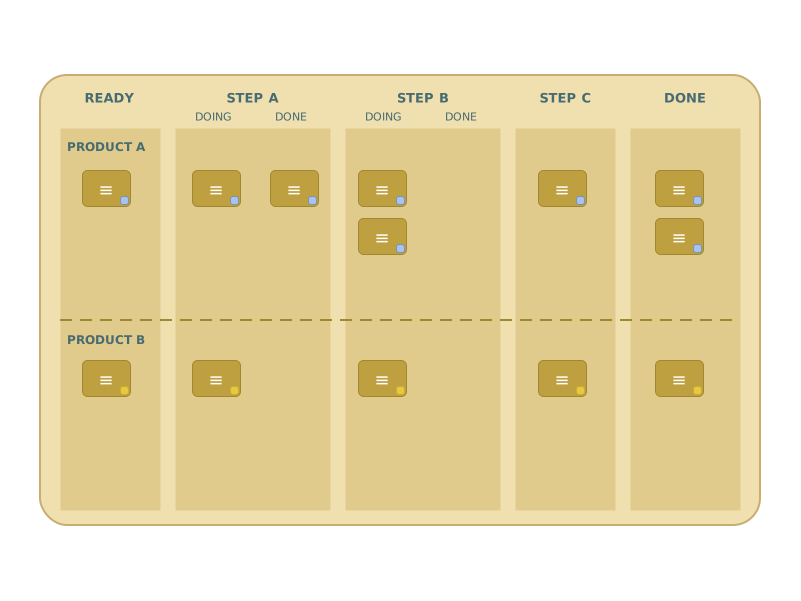
Same workflow. Different categories. One board that shows both.
Horizontal swimlanes organize flight items by product, outcome, or category — making it possible to see and manage each category's flow separately on a shared board.
The Problem
Different products, outcomes, or customer segments flow through the same coordination system. If they're all mixed together, priority decisions become impossible: are you spending enough attention on Product A? Is Product B being neglected?
How It Works
The board is divided into horizontal swimlanes — one per product, outcome, or category. All lanes share the same workflow columns, so the process is consistent. WIP limits can be applied per lane, giving explicit control over how much attention each category receives. When one item influences multiple outcomes, avatars (color stickers) work better than swimlanes — the item lives in one lane but carries markers for each outcome it affects.
When to Use It
- Items can be clearly assigned to a single product, outcome, or category
- You want to manage WIP separately per category
- Combined with "Multiple Parallel Flight Item Types" for cross-cutting visibility
Related Patterns
- Multiple Parallel Flight Item Types — swimlanes are often the mechanism for implementing that pattern
- Making Knowledge Bottlenecks Visible — shared backlogs across swimlanes reveal which work can't be started due to specialist gaps
Your play!
Get the cards and maps — all 18 FL2 Flow Patterns plus the new "Identify your Flow" companion map (A3 + A2 in EN, A3 in DE), ready to use in your next FL2 workshop or board design session.