Multiple parallel flight item types enable visibility and prioritization of different work categories on a shared coordination board.
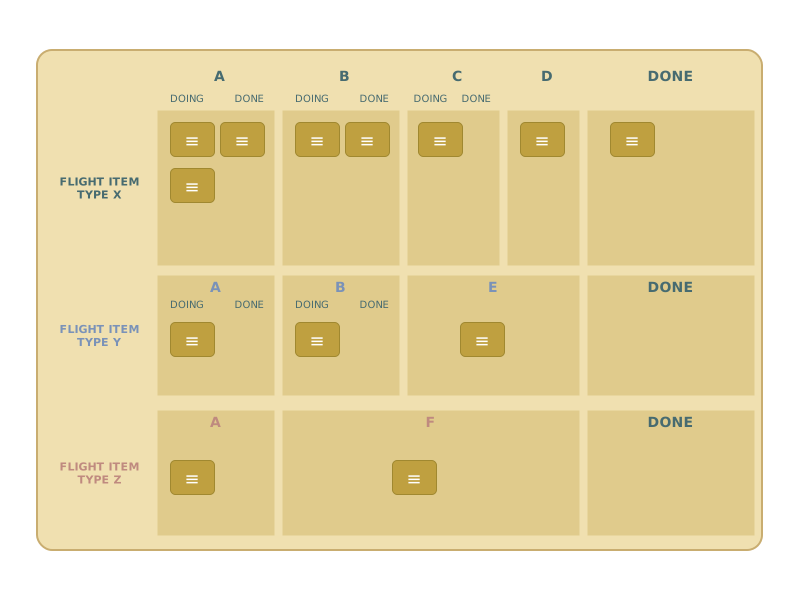
Different kinds of work. One board. Full picture.
When multiple types of work items flow through the same coordination system — features, bug fixes, technical debt, operational incidents — this pattern keeps them visible and distinct on a shared FL2 board.
The Problem
Your coordination board shows "work." But is it feature development, bug fixes, compliance tasks, or operational incidents? When everything looks the same, you can't see what's actually going on — and you can't prioritize effectively.
How It Works
Each flight item type gets its own swimlane (row) on the FL2 board. All lanes share the same workflow columns, but the work categories stay visually separate. At a glance, you can see how much of each type is in the system, where things are stacking up, and which type is starving for attention.
Separate boards can make sense when the board gets overwhelming, or when types are largely independent. Starting with one shared board usually reveals more than you expect.
When to Use It
- Multiple types of work flow through the same coordination system
- All types follow roughly the same workflow steps
- You want one shared board rather than separate boards per type
Related Patterns
- Swimlanes for Flight Items — swimlanes are the mechanism that makes this pattern work
- Flight Item Type Changes Over Time — when types don't just coexist but transform into each other
Your play!
Get the cards and maps — all 18 FL2 Flow Patterns plus the new "Identify your Flow" companion map (A3 + A2 in EN, A3 in DE), ready to use in your next FL2 workshop or board design session.